
Part I · Chapter 07
Saving, Renaming & Managing Setups
The File menu
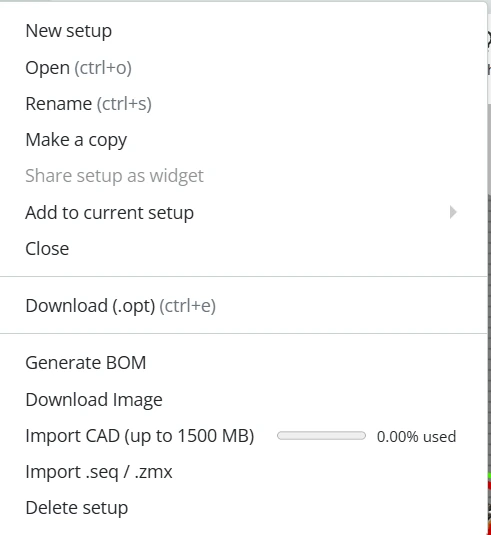
| Item | What it does |
|---|---|
| New setup | Creates a setup. |
| Open | Opens a saved setup from the cloud or a setup file from your computer. |
| Rename | Opens the Update setup details dialog: name, scene type, labels, description, privacy and sharing. |
| Make a copy | Saves the current setup under a new name and leaves the original as it is. |
| Share setup as widget | Creates a link to a read-only view of the setup. Anyone with the link can open it without an account, with a reduced set of analyses. |
| Add to current setup | Adds the parts of another setup, from the cloud or from a file, to the one you have open. |
| Close | Closes the setup in this tab so it can be opened in another. |
| Download (.opt) | Saves the setup as a .opt file, for backup or for sharing with other registered users (Ctrl+E, Professional-tier). |
| Generate BOM | Produces a bill of materials as a PDF (Professional-tier). |
| Download Image | Saves the current view as a JPEG or PDF at HD, FHD, QHD or 4K resolution. |
| Import CAD | Imports a STEP file as an optomechanics part. |
| Import .seq / .zmx | Imports a Zemax or CODE V prescription, when the importer is enabled for your account. |
| Delete setup | Moves the setup to the trash. |
Privacy and widget sharing
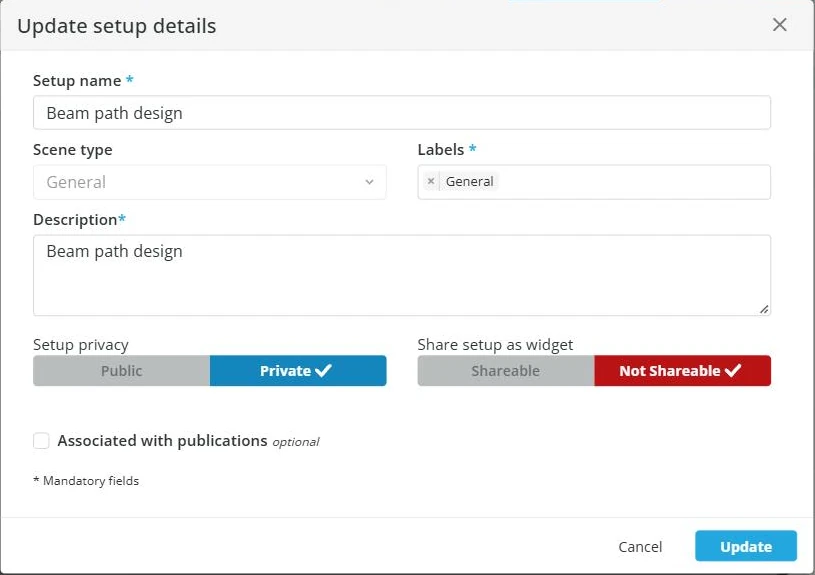
File → Rename opens the Update setup details dialog. Besides the name, scene type, labels and description, it holds two switches:
- Setup privacy, Public or Private, controls who can see the setup itself.
- Share setup as widget, Shareable or Not Shareable, controls whether the widget link works.
A Public setup is always Shareable. A Private setup starts as Not Shareable, but you can switch the widget to Shareable and keep the setup private, so that people with the link can view it without finding it.
Private setups and Not Shareable widgets are Professional-tier. On other plans every setup is Public and every widget is Shareable, and the switches are not shown.
Version history
When version control is enabled for your account, the left sidebar has a version panel that lists named configurations of the current setup. You can:
- Add a configuration, which saves the current state under a name.
- Switch to a configuration, which loads that state.
Configurations are handy for comparing variants of one setup. To keep a separate setup, use Make a copy.
Saving
Your changes are saved as you work. Use Make a copy at milestones you may want to return to.


